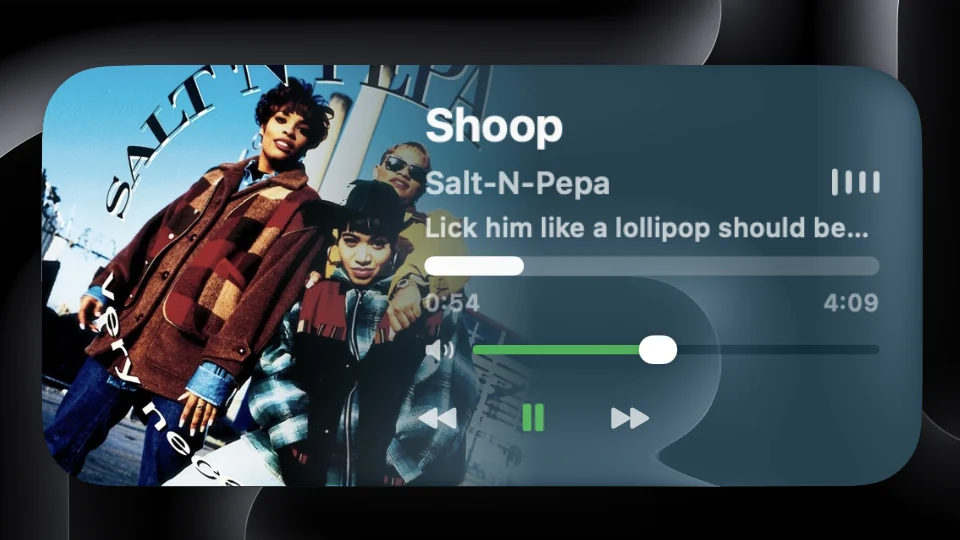
A place for the album you’re listening to.
Music can keep playing while your Mac is locked. Now Playing gives that listening session a home alongside your clock, weather or photos. It appears when you lock your Mac and leaves the screen when you sign back in.
Choose Inset, Compact or Full Height artwork layouts. Inset keeps the cover inside the glass panel; Compact leaves more space for controls; Full Height gives the artwork the left side of the widget. Small and Medium sizes are included with the free app.
Set up your music widget.
- Download WidgetScreen, open the disk image and move the app to Applications. Launch it on a Mac running macOS 15 or later.
- In Layout Studio, add Now Playing. Pick a size and drag it into position on the preview.
- Open its settings to choose the media source and artwork layout. Start a song in your music app.
- Lock your Mac with Control–Command–Q to check the finished layout. Keep WidgetScreen running; Launch at Login makes it available after you sign in.
Leave room around the macOS clock and sign-in controls. A compact widget works well near an edge; a larger cover suits a simpler wallpaper.
Pair the track with lyrics or motion.
The free Audio Visualiser adds particles and spectrum bars that respond to system audio. It optionally needs Screen & System Audio Recording permission to analyse sound on your Mac; the audio is not saved or transmitted.
For the words as well as the artwork, add Live Lyrics with Premium. Lyrics have their own playback-source and display settings, so you can keep them beside Now Playing or give them a separate part of the screen.
Before you download.
- Does this put a music widget on the desktop?
- WidgetScreen is designed for the lock screen and screen saver. Its widgets disappear when you unlock your Mac. Choose it if you want music visible while the Mac is locked.
- What does Premium add?
- Now Playing itself is free. Premium adds wider sizes, artwork tint and more appearance controls, as well as the separate Live Lyrics widget. See all Premium features.
- What if the song does not appear?
- Check the selected media source in Now Playing settings, confirm playback is active, and allow any permission the app requests for that source. For help with a particular app, contact Sam.