Choose what you see while you listen.
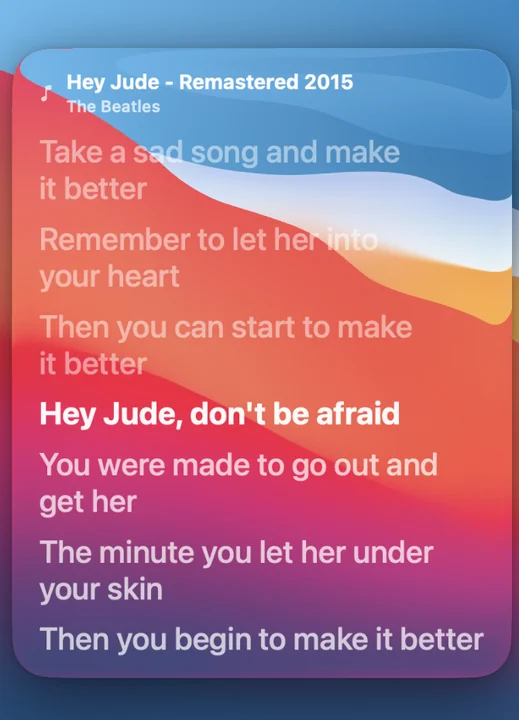
Set the playback source to Spotify, Apple Music, or either app. When timed lyrics are available for the playing track, the widget follows its progress and highlights the current line. You can choose text size, highlight style and left or centre alignment.
Keep the song and artist visible for context, or hide those details for a quieter layout. Live Lyrics works as its own widget: you can place it beside Now Playing, below your clock or in a clear area of your wallpaper.
Add Live Lyrics to your Mac lock screen.
- Install and open WidgetScreen on macOS 15 or later. Activate Premium to use Live Lyrics.
- Add Lyrics in Layout Studio, then choose its size and position.
- Choose Spotify, Apple Music, or either source in the Lyrics settings. Start a track in the selected app.
- Adjust the text and highlight settings. Lock your Mac with Control–Command–Q and check the words against your wallpaper.
Try a smaller block of text next to the album cover, or use a larger widget with song details hidden. The lock screen setup guide covers arranging widgets around the native macOS clock.
Lyrics depend on the song.
WidgetScreen looks up lyrics using the current track information. Some songs have timed lyrics, some have plain text, and some have no matching lyrics available. A different release, live recording or remix may not match the version in the lyrics catalogue.
Time synchronisation needs timed lyrics and playback information. If a track does not show the words you expect, check the playback source and try another song before changing your layout. Live Lyrics does not promise complete catalogue coverage.
What’s included?
Live Lyrics is a Premium widget. The core app and Now Playing are free, so you can try WidgetScreen’s lock-screen layout before choosing the optional one-time Premium purchase. Check Premium pricing and features.
WidgetScreen shows widgets on the lock screen and screen saver; it does not add a lyrics window to your unlocked desktop. It requires no WidgetScreen account. Playback and lyrics features use the services needed for the selected source; see the privacy policy for more detail.